
PK Club Game Login
Logging into your PK Club Game account takes under 30 seconds once you have your mobile number and password ready, and every successful daily login adds a small bonus to your wallet thanks to the streak reward system.
This is the complete login guide for clubpak.com.pk, covering Android, iPhone, and PC access, plus what to do if you forget your password or hit an “account locked” error.
Table of Contents
PK Club Game Login at a Glance
| Detail | Information |
|---|---|
| Login Methods | Mobile number + password, Username + password, OTP-only |
| Devices Supported | Android, iPhone, iPad, Windows, Mac |
| Average Login Time | Under 30 seconds |
| OTP Delivery Time | 30 seconds – 2 minutes |
| Password Recovery | Forgot Password → OTP reset |
| Daily Login Bonus | Activated automatically with each login |
| Session Timeout | 7 days of inactivity logs you out |
| Multi-Device Login | Supported, but limited to 2 active devices |
How to Login to PK Club Game (Step-by-Step)
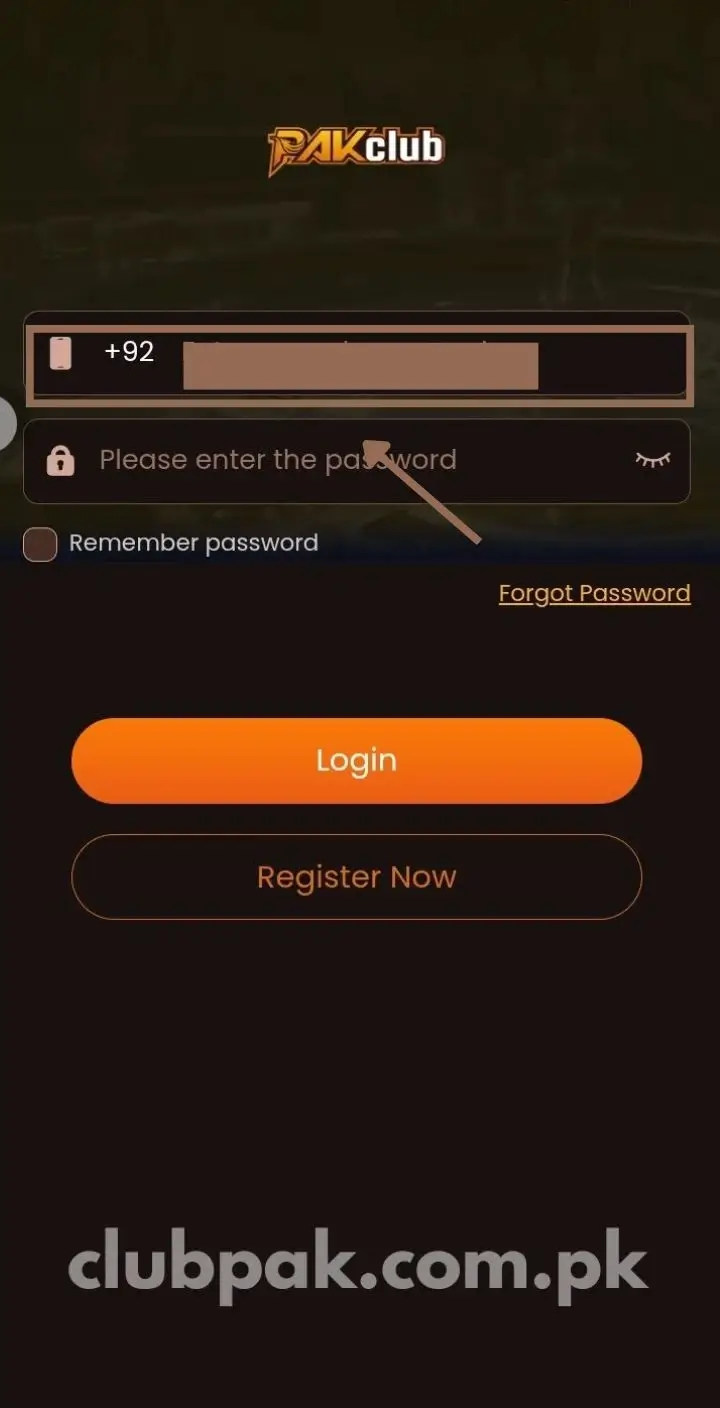
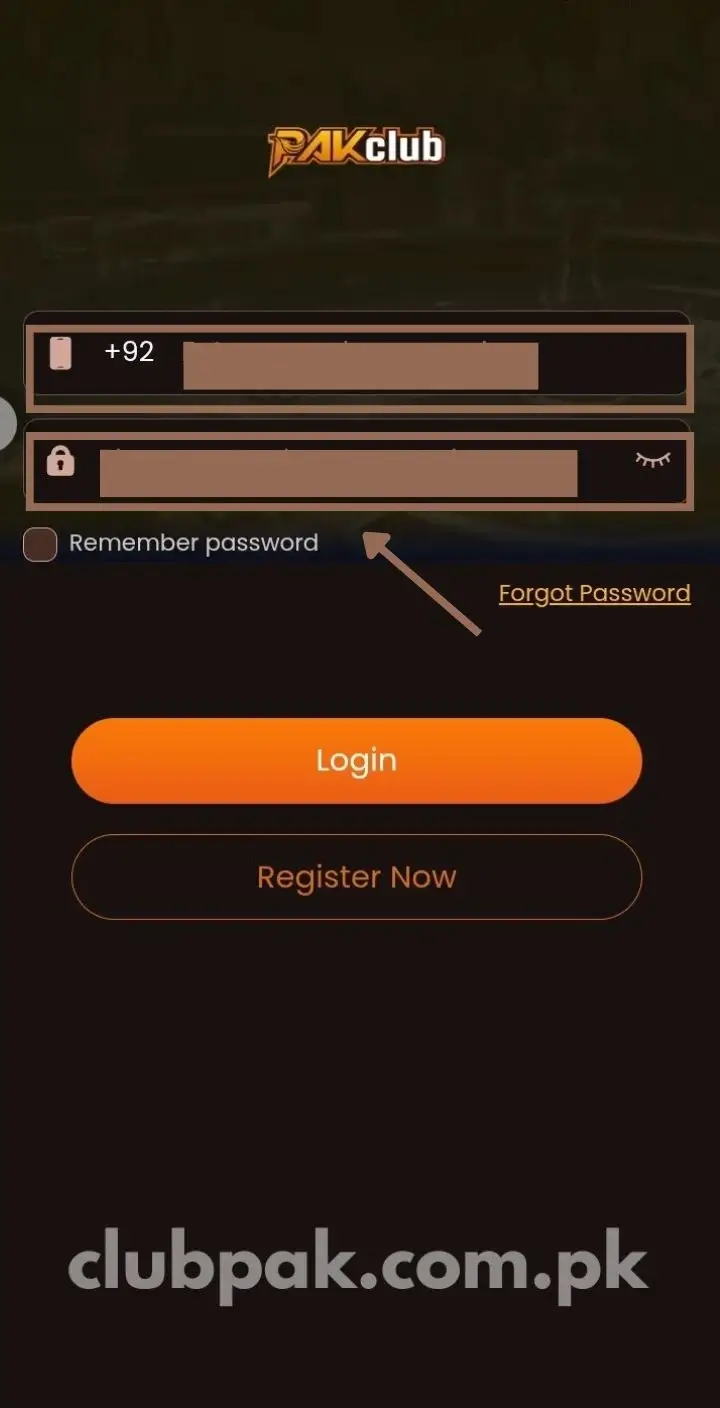
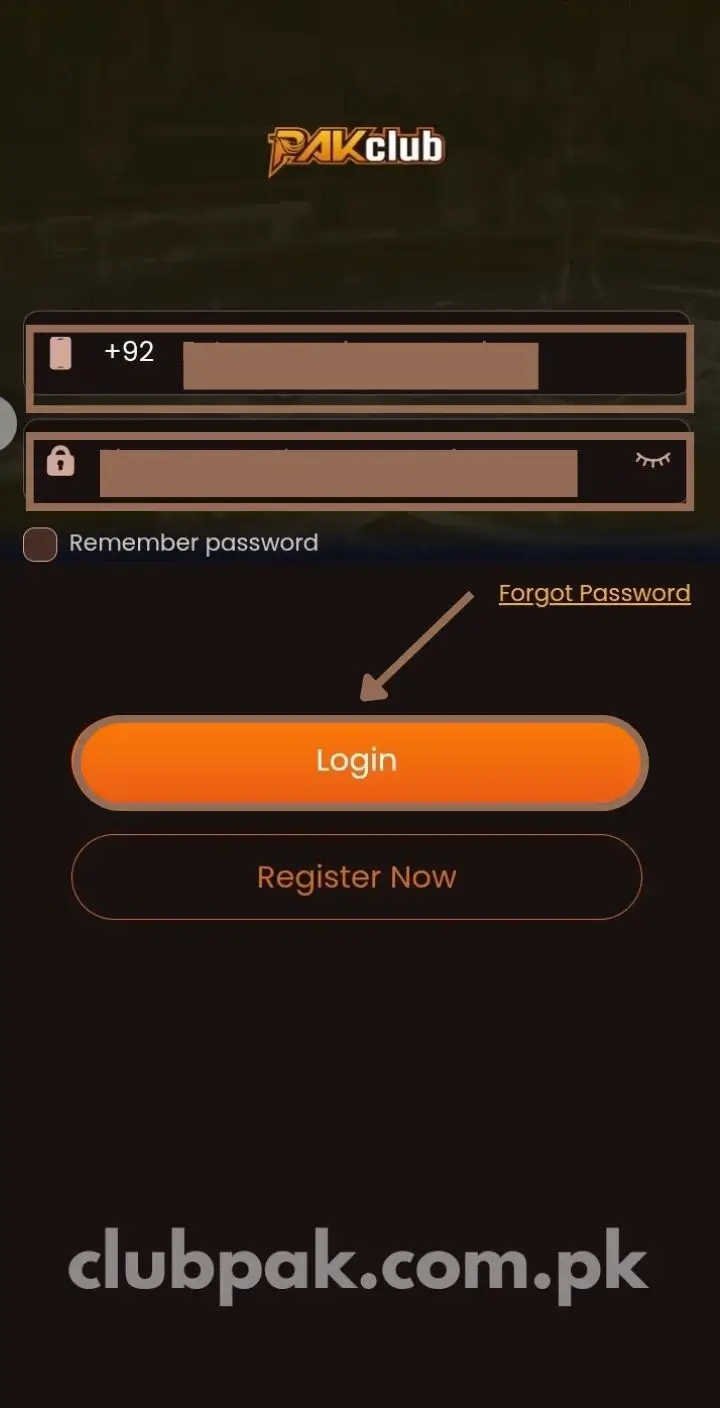
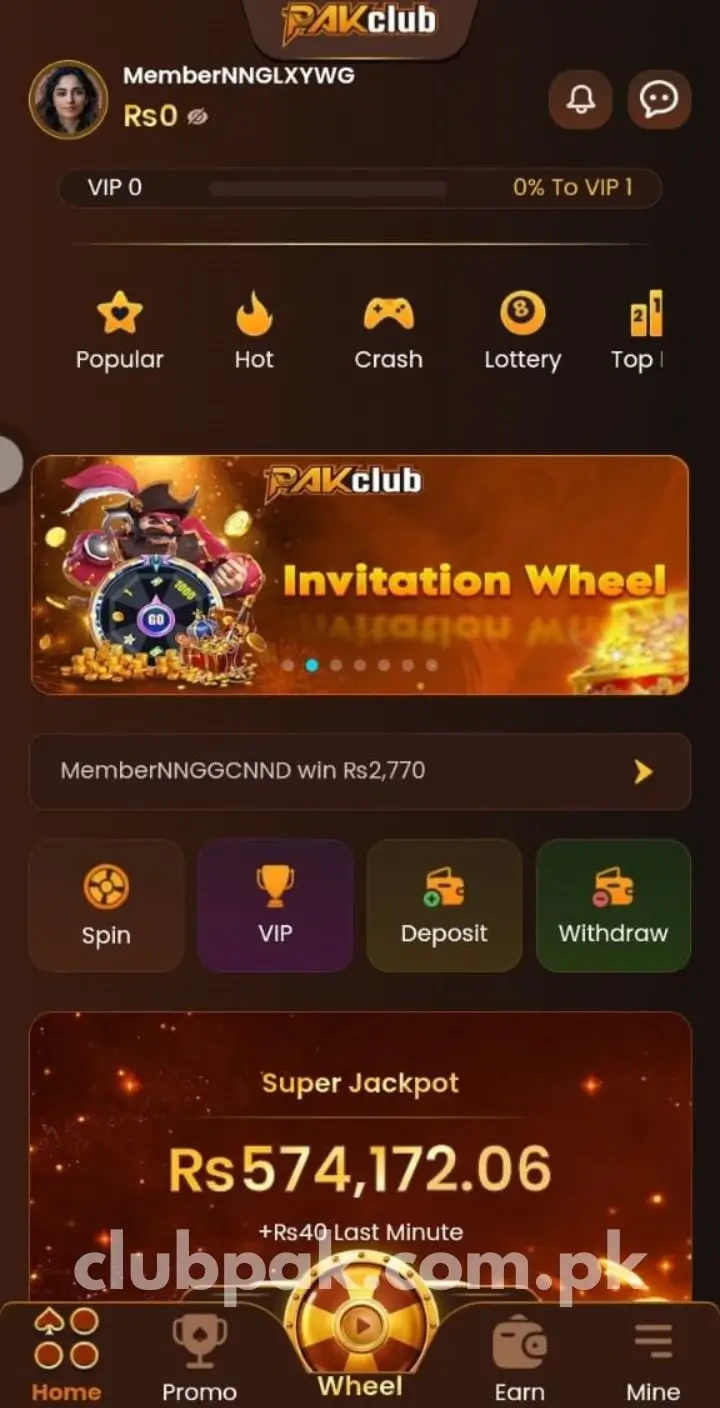
The login process is intentionally short. If you already have a registered account, you should be playing within a minute of opening the app.
Step 1: Open the PK Club Game App
Tap the PK Club Game icon on your home screen. Allow the app to fully load – this takes 3 to 5 seconds on a standard 4G connection.
If you’re using the web version, visit clubpak.com.pk directly in Chrome (Android) or Safari (iPhone).
Step 2: Tap the Login Button
On the welcome screen, you’ll see two main options: Register and Login. New users tap Register. Returning users tap Login to open the credentials form.
If you haven’t registered yet, head to our Register guide first – sign-up takes under 2 minutes and includes a free Rs 588 bonus.
Step 3: Enter Your Login Credentials
Type your registered details:
- Mobile number (or username, depending on how you signed up)
- Password (the one you created during registration, case-sensitive)
Double-check for typos before tapping Login. Wrong details three times in a row triggers a 15-minute temporary lockout for security.
Step 4: Complete OTP Verification (If Required)
For first-time logins on a new device, or logins after 30 days of inactivity, the app sends a 6-digit OTP to your registered mobile number. Enter the code in the verification field to confirm it’s really you.
OTP delivery times by network:
- Jazz, Warid: Under 30 seconds
- Telenor: 30-45 seconds
- Zong, Ufone: Under 2 minutes
For routine logins on your usual device, this OTP step is skipped – the app remembers your device fingerprint.
Step 5: Access Your Dashboard
Tap Login. Within 2-3 seconds, you land on your personal dashboard, where:
- Wallet balance shows at the top
- Active bonuses are listed in the Promotions tab
- Game categories appear in the main grid
- Daily login bonus credits to your wallet automatically
You’re now ready to play, deposit, withdraw, or claim any pending rewards.
Login on Different Platforms
PK Club Game’s login works the same way across devices, but the entry point differs slightly.
Android Login
Open the PK Club Game APK from your home screen. The login screen appears immediately on launch. This is the fastest login experience because the app caches your device fingerprint locally.
iPhone / iPad Login
Open Safari (not Chrome – only Safari works) and visit clubpak.com.pk. Tap Login from the homepage. If you’ve already added PK Club to your home screen as a Progressive Web App, you can launch it directly from the icon.
iOS users don’t need any extra setup. The same credentials work as on Android.
PC / Laptop Login (Browser)
Open any modern browser – Chrome, Firefox, Edge, Safari. Visit clubpak.com.pk and click the Login button at the top of the page. Enter your credentials and you’re in.
PC login is useful for longer play sessions on a bigger screen. All features work identically to mobile.
Why Reliable Login Matters
The PK Club Game login isn’t just a technical gate – it’s the bridge between you and your wallet, game history, bonuses, and active tournaments.
A successful login does five things automatically:
- Verifies your identity through password + OTP combination, protecting your wallet from unauthorized access
- Loads your PKR balance including any pending winnings and bonus credits
- Pulls your game history so live tournaments resume where you left off
- Activates your daily login streak which adds small bonuses for consecutive-day logins
- Connects you to live multiplayer rooms where real Pakistani players are actively competing
For live tournaments specifically, a secure login ensures fair competition and accurate reward distribution. For online mode, it saves your progress and stats across sessions.
Forgot Password? Here’s How to Recover
Forgetting your password happens. PK Club Game’s recovery flow takes about 60 seconds.
Step 1: Tap “Forgot Password” on Login Screen
Below the password field, you’ll see a Forgot Password? link. Tap it.
Step 2: Enter Your Registered Mobile Number
Type the same mobile number you used during registration. Tap Send OTP.
Step 3: Enter the OTP from SMS
A 6-digit code arrives via SMS within 30 seconds to 2 minutes. Enter it in the verification field.
Step 4: Create a New Password
Type a new password (minimum 6 characters, recommended 8+ with letters, numbers, and one special character). Confirm by typing it again.
Step 5: Log In with New Credentials
Return to the login screen and use your new password. You’re back in within seconds.
What if I forget my registered mobile number too?
This is rare but happens. Use the Self Service Center → Account Recovery option from the help section, or contact PK Club support through live chat. You’ll need to verify your identity through your last 5 deposit transactions or withdrawal details.
Common Login Issues and How to Fix Them
Most logins work first try. But here are the five most common issues and their fixes – all under 5 minutes.
Wrong Password Error
Cause: Typo, caps lock on, wrong password remembered.
Fix:
- Check if caps lock is enabled
- Try your password slowly, character by character
- After 3 failed attempts, you’re locked out for 15 minutes – use the Forgot Password option instead of waiting
OTP Not Received During Login
Cause: Weak network signal, SIM inactive, server delay during peak hours.
Fix:
- Wait one full minute before tapping Resend OTP
- Move to better network coverage
- Switch from mobile data to Wi-Fi (or vice versa)
- Confirm your SIM has active credit
App Won’t Load or Login Page Frozen
Cause: Outdated app version, cache overload, RAM issues.
Fix:
- Force-close the app (Settings → Apps → PK Club Game → Force Stop)
- Clear cache (Settings → Apps → PK Club Game → Storage → Clear Cache)
- Restart your phone
- Update to the latest V2.5 APK from clubpak.com.pk
Account Temporarily Locked
Cause: Three or more failed login attempts in a short period.
Fix:
- Wait 15 minutes – the lockout resets automatically
- During the lockout, use Forgot Password to reset and log in cleanly
“Account Not Found” Error
Cause: You’re entering the wrong mobile number, or your account was never fully verified.
Fix:
- Double-check the number you entered matches the one used at registration
- If you registered but never verified OTP, your account may not be active – register again with the same number
- Contact support through Self Service Center if the issue persists
Multi-Device Login Conflict
Cause: You’re trying to log in on a 3rd device while two are already active.
Fix:
- PK Club allows login on maximum 2 devices simultaneously
- Log out from one of your other devices first
- Then log in on the new one
Login Safety Best Practices
Your login credentials protect your wallet. Treat them like banking passwords.
Verify the URL or app authenticity. Make sure you’re using the official PK Club Game APK or clubpak.com.pk – fake mirror sites like clubpak.net or club-pak.pk attempt phishing.
Use a strong unique password. Don’t reuse the password from your Gmail, Facebook, or banking app. If one gets compromised, others stay safe.
Enable OTP or 2FA if available. Two-Factor Authentication adds a critical second layer. Even if someone gets your password, they can’t log in without your phone.
Avoid public Wi-Fi during login. Cafe, airport, or shopping mall Wi-Fi networks can expose login credentials. Use mobile data or trusted home Wi-Fi instead.
Check for SSL / HTTPS in the web version. The URL should always show https://clubpak.com.pk with a padlock icon. If you see http:// (without the s), don’t log in.
Verify app permissions. Genuine PK Club Game only needs Storage and Network access. If your installed app suddenly asks for Contacts or Camera permissions, uninstall and re-download from the official source.
Log out on shared devices. If you use a family phone or borrowed device, always log out after each session.
Keep the app updated. Login security patches often come with version updates. Check clubpak.com.pk monthly for new versions.
Monitor login activity. Under Mine → Account Security, you can see “Last login time” and active device list. If you spot an unknown device or location, change your password immediately.
Save withdrawal methods only after verification. Don’t add JazzCash or EasyPaisa details until your account is KYC-verified – this prevents withdrawal-related fraud.
Never share your OTP with anyone. No legitimate PK Club Game support staff will ever ask for your OTP. Anyone requesting it is attempting account theft.
Two-Factor Authentication (2FA) Setup
For maximum account security, especially if you’ve built up a larger wallet balance, enable Two-Factor Authentication.
To enable 2FA:
- Log into PK Club Game
- Go to Mine → Account & Security
- Tap Two-Factor Authentication
- Toggle it ON
- Confirm via OTP sent to your registered number
After enabling 2FA, every login requires:
- Your password (something you know)
- A fresh OTP via SMS (something you have)
This means even if someone gets your password, they can’t access your account without physical access to your SIM. Highly recommended for accounts with frequent deposits or larger balances.
Daily Login Bonus Reward System
One of the perks of logging in to PK Club Game every day is the daily login streak bonus. Each consecutive day adds to a multiplier that grows your bonus credit.
How the daily login streak works:
- Day 1: Small base bonus (around Rs 10-15)
- Day 3: Multiplier kicks in (around Rs 20-30)
- Day 7: First streak milestone reward (around Rs 50-80)
- Day 14: Two-week milestone bonus
- Day 30: Monthly streak rewards (largest single bonus)
Missing even one day resets the streak to zero. So if you’re at day 12, skipping day 13 sends you back to day 1 the next time you log in.
This is why many regular players set a daily reminder to log in and claim, even on days they don’t plan to play. Just opening the app and tapping “Claim Daily Bonus” is enough to keep the streak alive.
Quick Login Tip If Things Aren’t Working
If your login attempts are failing despite correct credentials, try this three-step reset:
- Clear the app cache – Settings → Apps → PK Club Game → Storage → Clear Cache
- Restart your phone – full power off, wait 10 seconds, power back on
- Update the app – visit clubpak.com.pk and install the latest V2.5 APK over your existing version (your account data stays intact)
This three-step reset fixes 90% of stubborn login issues without needing to contact support.
What You Can Do After Logging In
Successful login unlocks every feature on the platform:
- Play any of 200+ games across colour prediction, slots, card games, live tournaments
- Claim daily login bonus (visible top-right of dashboard)
- Spin the free wheel once every 24 hours
- Deposit funds via JazzCash, EasyPaisa, USDT, or bank transfer
- Withdraw winnings to your registered mobile wallet
- Join live multiplayer tournaments with real Pakistani players
- Claim active promotions from the Promotions tab
- Share your referral code from Mine → Invite Friends
- Track your game history and transaction records under Mine
- Submit support tickets through Self Service Center
For full details on what each feature does, visit our PK Club Game homepage which covers every game category, bonus type, and earning method.
Quick Summary: Login in 5 Steps
For users who want the fast version:
- Open PK Club Game app (or visit clubpak.com.pk)
- Tap Login
- Enter mobile number + password
- Verify OTP if requested (new devices only)
- Access your dashboard – daily login bonus credits automatically
Total time: under 30 seconds on a normal connection.
Frequently Asked Questions About PK Club Game Login
Why does PK Club Game ask for OTP every time?
Can I save my login so I don’t have to enter it every time?
What if I forget my password?
Can I login on multiple devices at the same time?
Is PK Club Game login safe?
What if my account gets locked?
Can I login without a mobile number?
Does login require an internet connection?
Why is my login slow or stuck on loading?
Can I login on iPhone the same way?
Does the daily login bonus require me to play?
What happens if I don’t log in for 30 days?
Can someone steal my account?
Why am I logged out automatically sometimes?
Can I login using my Facebook or Google account?
Final Note
The PK Club Game login system is built for speed and security – most users access their accounts in under 30 seconds, and the daily login bonus rewards consistent activity even on days you don’t play. The combination of OTP backup, optional 2FA, and SSL encryption keeps your wallet safe without making the login process complicated.